Find setup guides, API and webhook documentation, and answers to common WhatsApp Business API questions, or contact our support team.
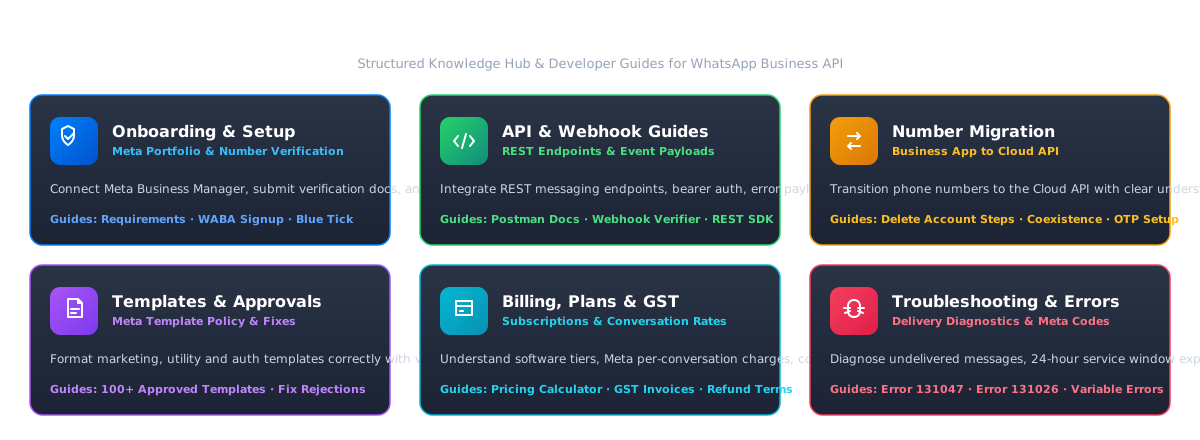
Explore guides, technical checklists, API references and billing details across six core areas.
Connect your Meta business portfolio, verify your phone number and apply for the blue tick.
Explore REST endpoints, authentication, error codes and webhook receiver examples.
Move your existing number to the WhatsApp Business API, with or without the Business app, and see what happens to your chats.
Write templates Meta approves, format variable samples correctly, and fix rejected ones.
Understand your plan, Meta per-conversation charges, conversation categories, and 18% GST invoices.
Fix undelivered messages, customer service window closures, parameter mismatches, and Meta Cloud API errors.
Organized documentation tracks to help engineering, marketing, and support teams scale on the official WhatsApp Cloud API.
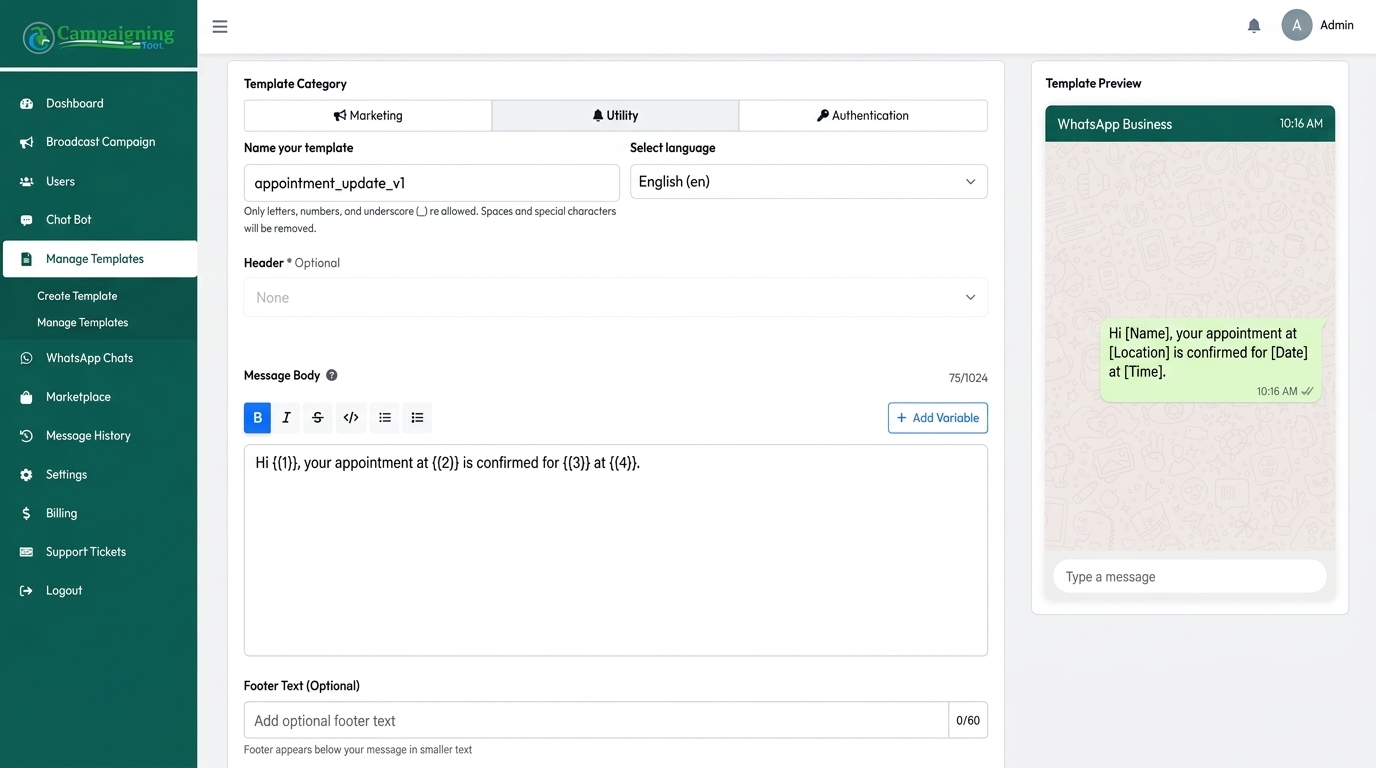
Meta requires all outbound business-initiated messages to follow an approved template schema. In the CampaigningTool dashboard, you can easily configure marketing, utility, or authentication templates.
{{1}} and {{2}} so Meta reviewers understand context.
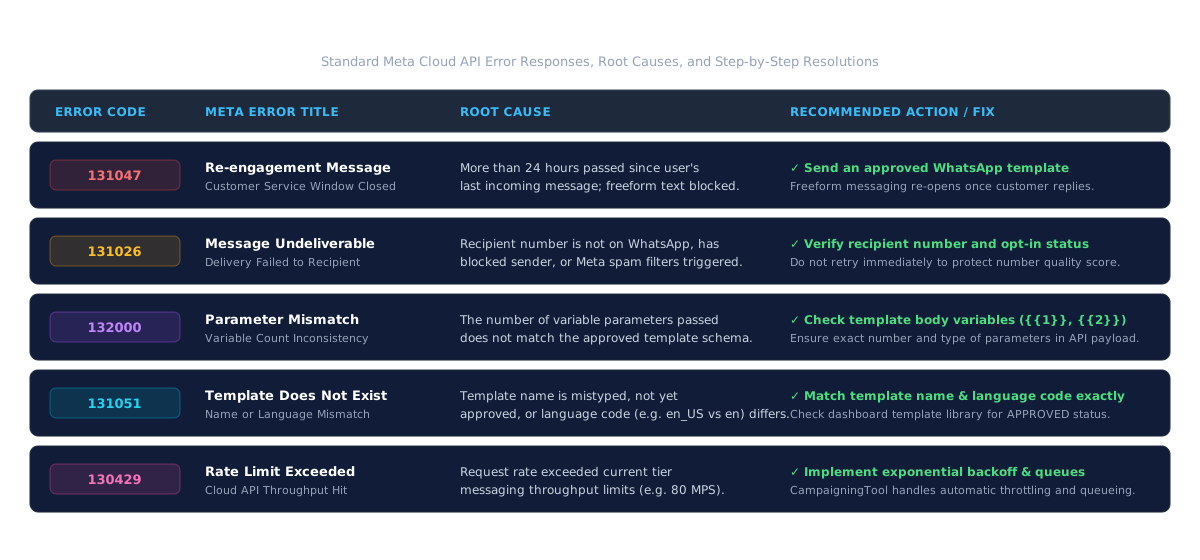
Understand standard Meta Cloud API error response codes, why they occur, and how to resolve them immediately.
Answers to frequently encountered setup questions, error resolutions, and platform best practices.
How to submit a WhatsApp message template for approval
Step-by-step walkthrough of creating templates in the dashboard, specifying variable samples, and tracking Meta approval status.
Why was my WhatsApp template rejected? Common reasons and fixes
Fix category mismatches, missing variable sample values, promotional phrasing in utility templates, and sensitive info requests.
Why can't I send a message to a customer? (24-hour window and opt-in)
Understanding Meta's 24-hour customer service window, opt-in consent prerequisites, and when approved templates are mandatory.
WhatsApp API error 131047 explained
Root cause: Re-engagement message required outside the 24-hour window. How to trigger template messages to re-open customer chats.
WhatsApp API error 131026 (message undeliverable) explained
Why delivery fails when recipients are inactive on WhatsApp, numbers are formatted incorrectly, or sender quality rating drops.
Template parameter errors: fixing mismatched variables
Resolving Error 132000 by aligning API payload parameter counts with the exact variable placeholders defined in Meta templates.
WhatsApp Business app vs WhatsApp Business API
Detailed breakdown of broadcasting capabilities, 256 recipient broadcast list limits, multi-agent shared inboxes, and AI automation.
How to connect your Meta business portfolio
Prerequisites for Meta Business Manager verification, business legal documents, admin 2FA, and WhatsApp Business Account linkage.
How to set up webhooks and verify them
Configure real-time bi-directional webhook receivers, verify tokens (hub.verify_token), and handle inbound message event callbacks.
How to apply for the blue tick
Meta Official Business Account (OBA) blue verified check eligibility criteria, organic notability evaluation, and submission workflow.
How to add team members and assign chats
Configure role-based permissions (Admin, Agent, Manager), routing rules, internal notes, and shared multi-agent inbox workflows.
How to export your contacts and campaign reports
Download delivery, read-rate, and click-through CSV analytics reports to measure campaign performance and contact engagement.
Accurate answers regarding the WhatsApp Business API, template submission, CRM integrations, messaging limits, and support.
The WhatsApp Business app is built for small businesses that reply manually from a phone, with limited broadcast lists (up to 256 contacts per list, and only those who saved your number). The WhatsApp Business API connects to software so you can automate messages, share an inbox between team members and use AI agents, within Meta's messaging limits. A blue tick is a separate request that Meta reviews.
Open Templates in your dashboard, choose a category, write the message with sample values for any variables and submit it. Meta reviews it, and review time varies.
You can connect Salesforce, HubSpot, Zoho, SAP, and custom database backends, or connect any CRM through our REST API and webhooks.
Common reasons are the wrong category, missing sample values for variables, promotional wording in a utility template, and requests for sensitive information such as ID or card numbers.
Outside the 24-hour customer service window you must use an approved template, the customer must have opted in, and your number must be in good standing. A common error is 131047 ("re-engagement message").
Email [email protected] or create a ticket in your dashboard. Our support team reviews and responds to tickets during business hours as quickly as possible.
See our Refund Policy.
Email [email protected] or create a ticket, and our team will reply as soon as possible.