Send dispatch notifications, live GPS courier tracking links, out-for-delivery alerts, delivery OTPs, and instant electronic proof of delivery receipts on WhatsApp. CampaigningTool connects your warehouse or courier software to the official Meta Cloud API so customers get timely updates without calling support.
Automate key milestones across the last-mile parcel journey to cut inbound "Where is my order?" tickets.
Out-for-Delivery & Live Tracking
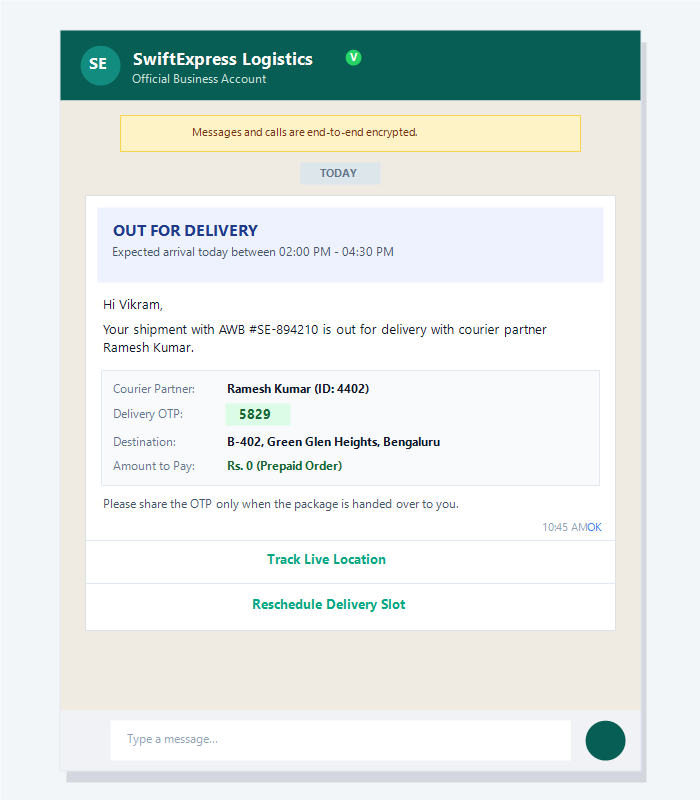
Send morning out-for-delivery alerts with the courier partner's name, expected delivery window, and a one-tap live GPS tracking button.
Secure Delivery OTPs & e-POD
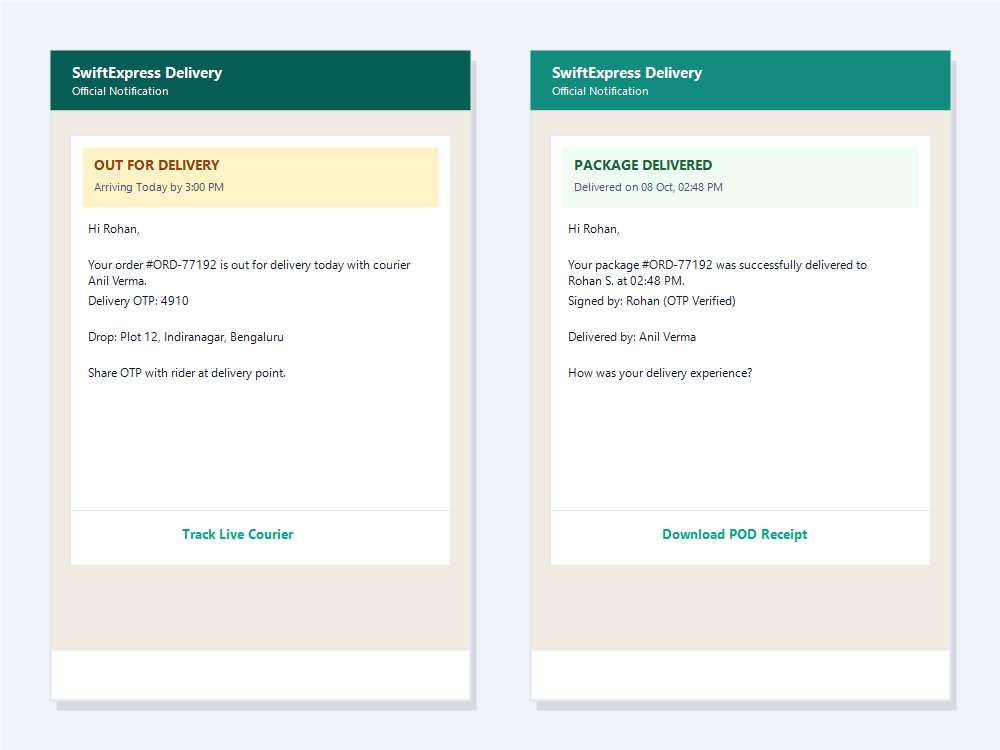
Deliver a 4-digit handover OTP to the customer and instantly send an electronic proof-of-delivery (e-POD) confirmation once validated.
1-Click Address Correction & Rescheduling
Let recipients confirm address details, add landmark notes, or reschedule delivery slots directly in the WhatsApp chat before the rider departs.
More than 60% of customer calls to e-commerce and logistics support desks are simple "WISMO" (Where Is My Order?) enquiries. When customers receive SMS updates, links are frequently ignored, marked as spam, or buried in unread text threads. WhatsApp delivers a 98% open rate, ensuring customers know exactly when their parcel has been dispatched, when it is out for delivery, and who is carrying it.
Failed deliveries (RTO - Return to Origin) are the largest cost driver in last-mile operations. When recipients can verify their address, drop landmark pins, or request a next-day slot within the chat, first-attempt delivery success increases dramatically.
After delivery, WhatsApp provides an instant digital audit trail: time-stamped OTP verification, rider identification, and an automatic request for customer feedback that keeps service ratings high.
Connect your warehouse management software (WMS) or courier API to automate end-to-end parcel tracking.
Trigger instant WhatsApp notifications when an order is packed and picked up. Include the courier name, tracking number (AWB), and item summary.
Embed interactive tracking URLs that open real-time courier vehicle tracking on a map without requiring mobile app installations.
Prevent false delivery claims by sending a secure 4-digit OTP that the customer must share with the delivery executive upon package handover.
Use native WhatsApp forms to let recipients add gate codes, building numbers, or alternate phone numbers before courier arrival.
Send an immediate PDF delivery receipt and confirmation message the moment the courier marks the package delivered in their field app.
Automatically prompt recipients to rate the rider and delivery speed with interactive quick-reply buttons and Google review prompts.
Go live with automated delivery notifications in four straightforward steps.
Register your business number on the official WhatsApp Business API via CampaigningTool. If you need setup help, see our WhatsApp Business API page.
Integrate your ERP, WMS, Shopify, ClickPost, Shiprocket, or custom courier system with our REST API to trigger alerts automatically.
Select pre-formatted dispatch, out-for-delivery, OTP, and POD templates from our template library and submit to Meta for approval.
Notifications dispatch automatically on milestone triggers, and non-delivery issues route to your support team in the team inbox.
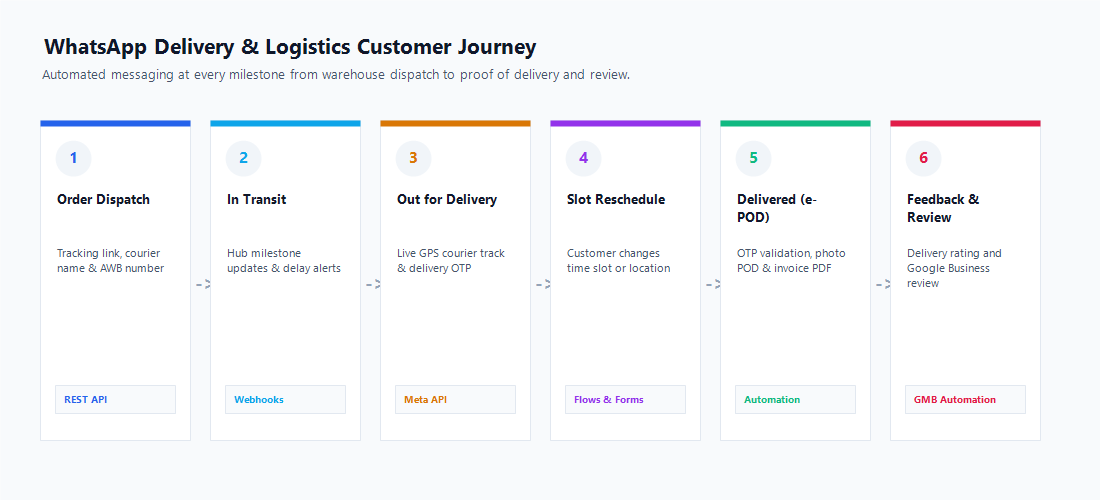
Automate customer updates at every critical milestone from dispatch to delivery confirmation.
Official Meta utility and marketing templates with interactive buttons.
Hi {{First_Name}}, your shipment #{{Tracking_Number}} has been dispatched via {{Courier_Name}}. Estimated delivery: {{Expected_Date}}.
Hi {{First_Name}}, your parcel is out for delivery today with {{Rider_Name}}. Your delivery OTP is {{OTP_Code}}. Please share OTP at package handover.
Hi {{First_Name}}, your package #{{Tracking_Number}} was delivered successfully to {{Recipient_Name}} at {{Delivery_Time}}. Thank you for choosing us!
Hi {{First_Name}}, our rider could not reach you for parcel #{{Tracking_Number}}. Please pick a convenient re-attempt delivery date below.
Hi {{First_Name}}, how was your delivery experience with {{Rider_Name}} today? Please take 5 seconds to share your review.
*Note: These are representative template samples. Meta reviews and approves all templates and determines their exact utility or marketing categorization.
Maintain high template quality ratings and adhere to data protection standards.
From hyperlocal grocery couriers to national freight networks.
Hyperlocal & Quick-Commerce
Real-time 10-to-30 minute live rider tracking, delivery OTPs, and gate drop confirmations.
National Courier & Express Parcel
AWB dispatch updates, multi-hub tracking milestones, out-for-delivery alerts, and e-PODs.
D2C Brands & E-Commerce
Direct Shopify and WooCommerce order tracking, COD address verification, and delivery feedback.
B2B Freight & Supply Chain
Consignment dispatch alerts, bill of lading sharing, gate-in/gate-out logs, and invoice receipts.
Dispatch and out-for-delivery updates are usually utility templates, a delivery OTP is authentication, and any offer is marketing, each billed at Meta's rate for its category. You pay your CampaigningTool plan plus 18% GST on top, with Meta's charges passed through at cost. Explore our subscription plans for detailed features and API quotas.
Common questions about tracking links, delivery OTPs, API webhooks and integrations.
When your warehouse or courier software changes an order status (e.g. Dispatched, Out for Delivery, Delivered), a webhook or REST API call triggers an approved Meta template message to the recipient on WhatsApp with live tracking details.
Yes. You can include a dynamic action button (e.g., "Track Live Courier") that opens your web-based live GPS tracking screen with the recipient's unique tracking session pre-loaded.
When the rider marks the shipment out for delivery, your system generates a 4-digit OTP and dispatches it via a utility template. The customer shares the OTP with the rider at handover to confirm successful delivery.
Yes. You can send a native WhatsApp form where the customer selects a new delivery date or adds landmark notes. The updated details are posted back to your courier system via webhook.
Yes. You can connect custom ERPs, warehouse management systems (WMS), Shopify, WooCommerce, Shiprocket, ClickPost, or any system capable of sending JSON HTTP requests via our REST API.
Customer replies open a 24-hour service window. The conversation appears immediately in the team inbox, or can be answered automatically by our WhatsApp AI Agent.
Yes. You can send an automated message containing delivery timestamps, receiver name, and an attached PDF delivery receipt or invoice directly into the chat.
Yes. With WhatsApp Pay and payment gateway integrations (Razorpay, Cashfree), you can send an in-chat UPI payment link before handover to convert COD orders into prepaid deliveries.
By confirming addresses prior to dispatch, notifying customers of out-for-delivery timing, and providing an easy option to reschedule slots, recipients are present for delivery, cutting RTO rates substantially.
Dispatch and out-for-delivery updates are usually utility templates, a delivery OTP is authentication, and any offer is marketing, each billed at Meta's rate for its category. See the pricing page for current plans.
Combine messaging with automated scheduling, forms, team collaboration, and payments.
WhatsApp Forms
Collect address corrections, landmark details, and preferred delivery time slots in chat. Explore Forms
Campaign Scheduler
Schedule dispatch digests and follow-up review reminders automatically. Explore Scheduler
Multi-User Team Inbox
Route customer WISMO queries and exceptions to support teams across branches. Explore Team Inbox