
Travel and hospitality businesses can send booking confirmations, trip updates and check-in details to their guests on WhatsApp, and answer their questions from one shared number. CampaigningTool runs on the official WhatsApp Business API, so your reservations, front desk and support teams can all reply in one place, and every message goes to people who agreed to hear from you.
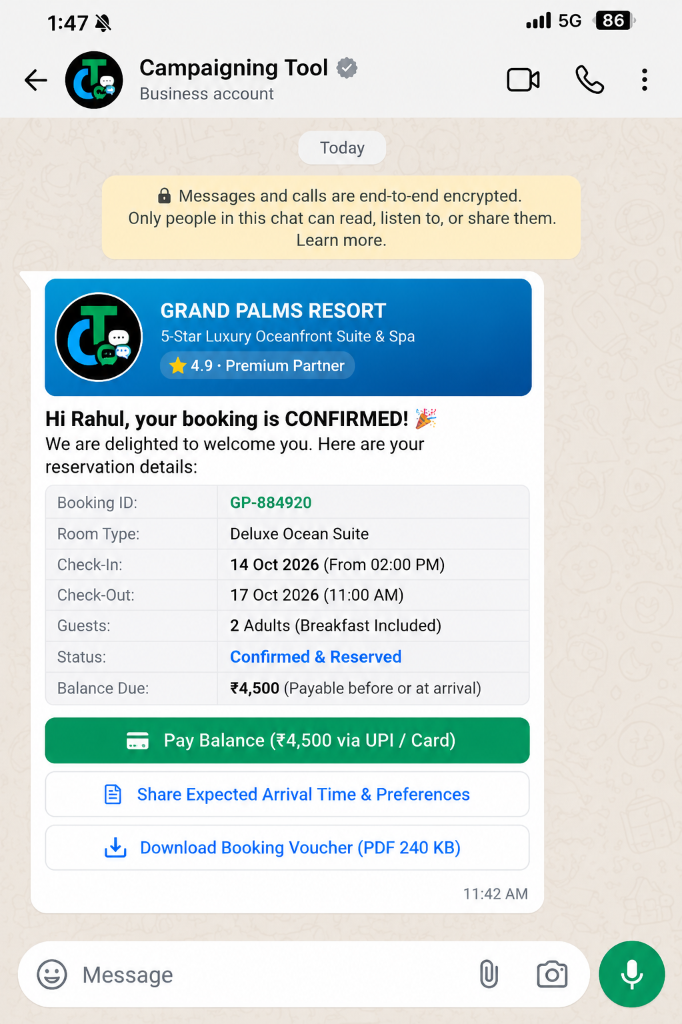
Deliver frictionless hospitality from the first booking inquiry to post-checkout review collection.
Booking confirmations and reminders
Send the booking details, check-in dates, room type, the amount paid and an in-chat payment link for the remaining balance.
Tickets, vouchers and itineraries
Share PDF tickets, hotel vouchers and day-by-day sightseeing plans in the same chat, so guests don't have to dig through email or download separate apps.
Guest questions during the stay
Guests ask about check-in times, Wi-Fi passwords, directions or a late checkout, and your front desk team replies in seconds from the shared team inbox.
Travellers are on their phones, often on the road, and they want a quick answer, not a call centre queue. A guest who can message "Where do I park?" or "Is my pickup confirmed?" and get a reply in minutes is a guest who feels looked after and valued.
WhatsApp also keeps everything in one continuous thread: the reservation, the hotel voucher, the deposit payment link and the post-stay follow-up. Your reservations team stops searching through fragmented email inboxes, and the guest never has to repeat the same question twice.
Equip your team with purpose-built tools for every operational touchpoint.
Confirm a booking the moment it is made, with dates, guest names, the exact amount paid, and what happens next.
Send PDF tickets, vouchers, tour itineraries and interactive location maps directly as native WhatsApp media attachments.
Send a 1-click payment link for booking deposits and final room balances, and immediately follow up with an automated digital receipt.
Send a native WhatsApp form for expected arrival time, number of guests and special meal or room requests, so the front desk is prepared.
An AI agent answers common questions about breakfast timings, pool rules, Wi-Fi and nearby attractions from your documents, and routes complex requests to staff.
After checkout, ask every guest for a Google review using an automated, policy-compliant post-stay follow-up.
Go live in four straightforward steps without technical complexity.
Link your official WhatsApp Business API number. If you need assistance getting started, visit our WhatsApp Business API guide.
Add an explicit opt-in tick box on your booking engine, website and front desk check-in cards, and timestamp when and where the guest agreed.
Choose pre-built templates from our template library and submit them to Meta for instant review and categorisation.
Send messages manually, in scheduled batches, or automatically from your PMS/booking system via our REST API, and manage chats in the team inbox.
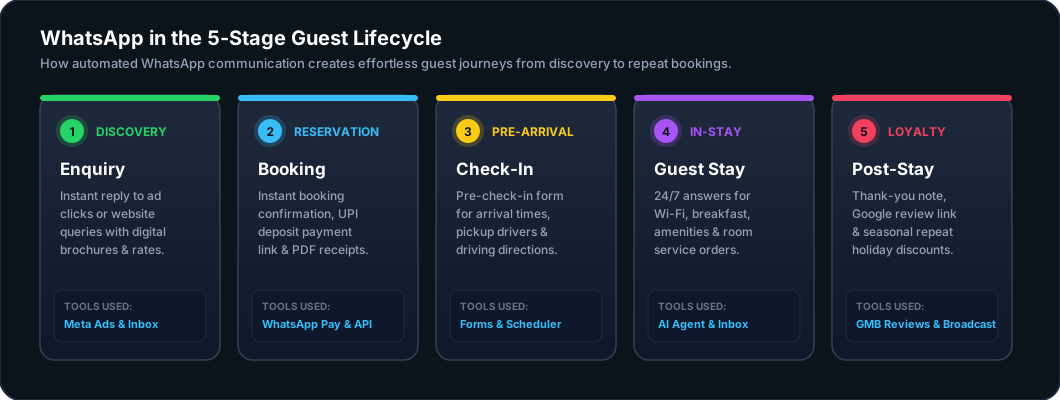
From initial holiday discovery to repeat bookings, see how WhatsApp streamlines each guest milestone.
| Stage | What You Can Send | Recommended Tool |
|---|---|---|
| Enquiry | Reply to a question from an ad or your website, and share the brochure, room photos or seasonal rate card. | Click-to-WhatsApp ads, Team Inbox |
| Booking | Instant confirmation message, deposit payment link, and PDF invoice receipt. | WhatsApp Pay, REST API |
| Before arrival | Pre-arrival check-in form, driving directions, airport pickup details, and local weather tips. | Forms, Scheduler |
| During the stay | Answer front desk questions, share spa menu, breakfast timings, Wi-Fi code, and local sightseeing recommendations. | AI Agent, Team Inbox |
| After checkout | Thank-you note, Google review request link, and early-bird offers for their next vacation. | Broadcast, Google reviews |
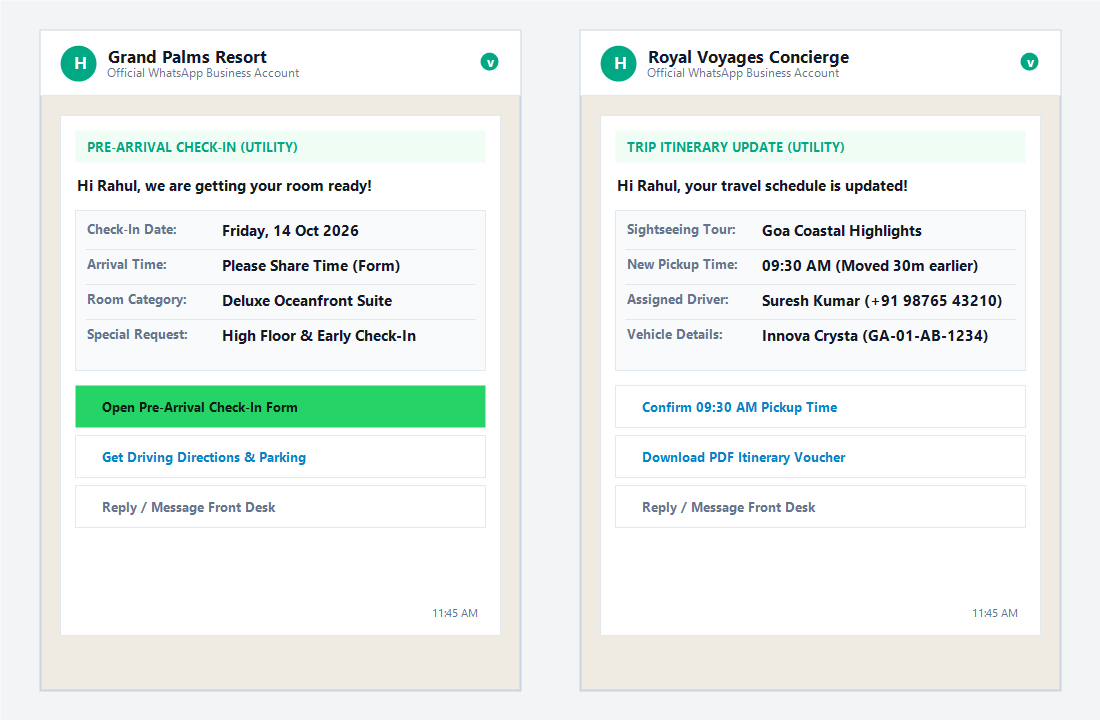
Use pre-approved, high-converting WhatsApp message structures for guest communication.
These are representative samples. Meta reviews every submitted template and assigns its final classification (Utility, Marketing, or Service).
Ensure legal adherence, guest trust, and 100% compliance with Meta and Google policies.
Customized workflows for every type of hospitality provider.
Hotels, resorts and homestays
Booking confirmations, room upgrade options, check-in details, real-time guest concierge queries, and automated Google review requests.
Travel agencies and tour operators
Detailed daily itineraries, hotel vouchers, deposit collection payment links, flight change notices, and package lead qualification.
Cab and transfer services
Airport pickup details, driver contact cards, vehicle number plates, live GPS tracking links, and instant schedule change alerts.
Restaurants, spas and activity providers
Table reservation alerts, spa slot reminders, digital PDF menus, and exclusive seasonal return discounts for loyal patrons.
Booking confirmations and itinerary changes are usually utility templates, and offers for a return trip are marketing, so your Meta bill depends on the mix you send. You also pay your CampaigningTool plan plus 18% GST, and we don't add to Meta's rates.
Explore Pricing Plans & Meta RatesCommon questions about bookings, documents, check-in and reviews.
Yes, through the official WhatsApp Business API. You message only guests who agreed to hear from you, and you use templates approved by Meta. Your whole team can reply from one number.
Yes. Send an approved template with the guest's name, dates, booking number and a payment link for any balance. You can send it by hand, in bulk, or automatically from your booking system through our REST API.
Yes. You can attach PDFs and images to a message, so guests keep their ticket, voucher or day-by-day plan in the same chat as the booking.
Yes. Guests message your number and your team replies from the team inbox. An AI agent can answer common questions about timings and policies, and pass requests like room service or a spa slot to your staff.
You can send trip updates as approved templates, such as a pickup change or a new departure time. CampaigningTool sends the message. The flight or trip data has to come from your own booking system, which you can connect through the REST API.
You can send a WhatsApp form for arrival time, number of guests and requests. ID documents are sensitive, so ask only where the law requires it, explain why, and use a secure upload link where you can.
Yes. Send a message after checkout with a direct link to your Google review page, using our Google review tool. Ask every guest, not only the happy ones, and don't offer rewards for reviews, because Google's policy doesn't allow it.
Yes. With Click-to-WhatsApp ads, people tap your ad and land in a WhatsApp chat with your team or your AI agent, ready to ask about rooms, packages or dates.
Yes. Everyone replies from the same number in the team inbox, and each chat can be assigned to the right person or department.
Booking confirmations and itinerary changes are usually utility templates, and offers for a return trip are marketing, so your Meta bill depends on the mix you send. See the pricing page for current plans.
Powerful platform capabilities to automate operations across your hospitality brand.
WhatsApp Pay
Collect deposits, reservation fees, and activity charges seamlessly inside the chat.
Set Up In-Chat PayAI Agent
Autonomous 24/7 guest concierge answering room, pricing, and amenities queries instantly.
Build Hospitality AITeam Inbox
Manage reservations, concierge, and guest support from a single verified WhatsApp number.
Explore Team InboxClick-to-WhatsApp Ads
Convert Facebook and Instagram vacation ad clicks directly into high-intent chats.
Connect Meta AdsGoogle Business Profile Reviews
Automatically send review requests after checkout to build authentic local credibility.
Automate ReviewsWhatsApp Forms
Interactive in-chat forms for seamless pre-arrival check-ins and meal preference surveys.
Build Check-in FormsConnect your number, get your templates approved and send your first booking confirmation. Try it free for 7 days.