Let patients book OPD slots, get appointment and follow-up reminders, and find out when a report is ready, on the app they already use. CampaigningTool runs on the official WhatsApp Business API, so clinics, hospitals and diagnostic centres can manage patient messages from one number. Messages go only to patients who agreed to receive them, and they cover administration, not medical advice.
Simplify front-desk coordination, reduce clinic no-shows, and provide reliable administrative updates.
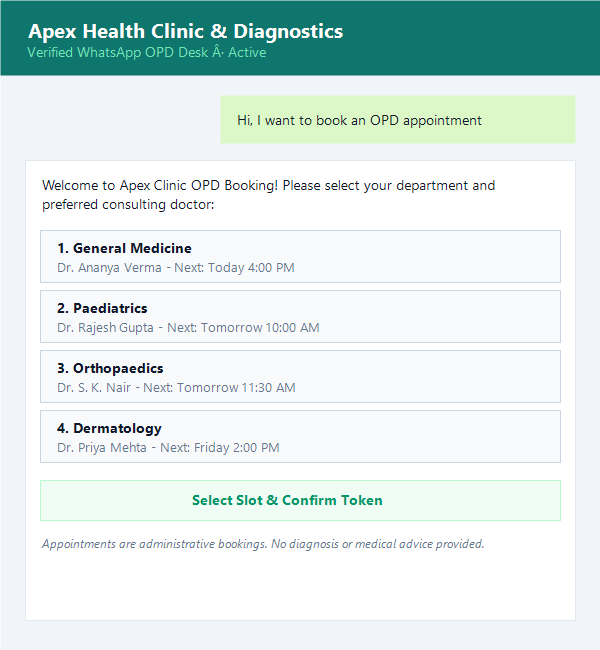
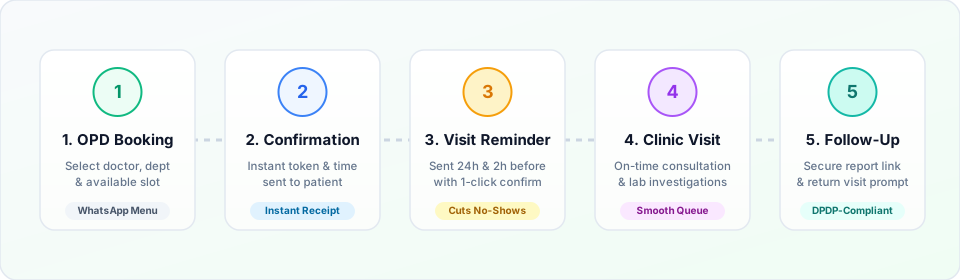
Patients choose a department, doctor and available slot from a WhatsApp menu and get a confirmation.
Tell patients when a test report is ready and share it through a secure link or password-protected PDF, only with their consent. Keep results out of the message text.
Reports are shared via tokenized links or encrypted PDFs. Patient diagnosis and test metrics remain strictly confidential.
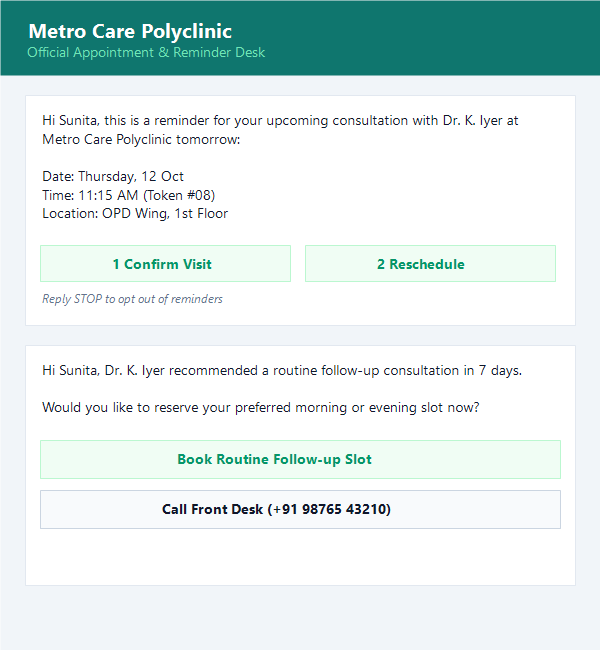
Remind patients about visits, follow-ups and prescription refills your clinic chooses to send.
Set up a compliant, automated patient communication channel in four straightforward steps.
Connect your official WhatsApp Business API number on Meta Cloud infrastructure for reliable delivery.
Set up your departments, doctors and reminder messages, using approved templates from our template library.
Collect patient consent at registration or booking, ensuring every communication has verified opt-in.
Reply from the shared team inbox, with the AI agent handling routine questions and booking.
Administrative templates that keep medical conclusions and sensitive clinical details out of message text.
Sent immediately after patient books via WhatsApp or receptionist confirms slot.
Includes secure link; no diagnostic values or clinical conclusions in message body.
Enables 1-click booking without requiring app installation or complex logins.
Compliance Note: These examples contain no diagnosis, test result or medicine names, and your real templates shouldn't either.
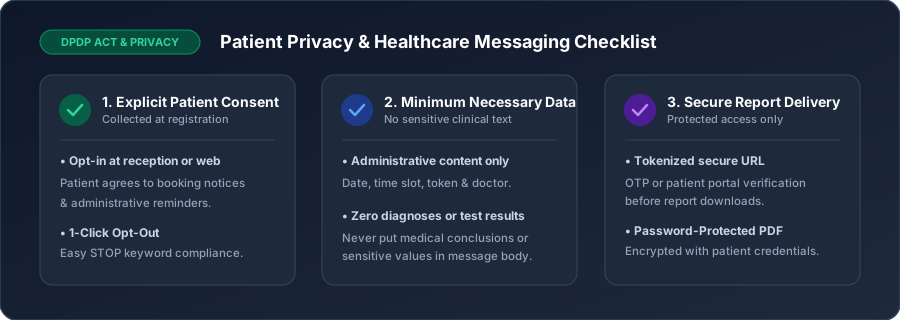
Maintaining patient confidentiality and regulatory compliance under Indian DPDP and global privacy frameworks.
Send messages only to patients who agreed to receive them, for example at registration or when they book. Keep clinical details such as diagnoses and test results out of message text, and share reports only through a secure link or password-protected file, and only with the patient's consent. Follow the privacy laws that apply to you, such as India's DPDP Act. WhatsApp is not a replacement for your hospital or clinic records system. See our WhatsApp API requirements.
Read how real healthcare and clinical providers streamline administrative tasks in our case studies. You can also automate clinic reviews on Google Maps via Google Review Automation and collect consultation token fees via WhatsApp Payments where supported.
Clear answers on patient privacy, system connectivity, doctor scheduling, and official API pricing.
Patients who agreed to receive messages can book an OPD slot from a WhatsApp menu, get a confirmation, and receive reminders before the visit, all from one official WhatsApp number.
Yes. Patients choose a department, doctor and available slot.
Only with the patient's consent. Send a secure link or a password-protected file, and keep results out of the message text. Check the privacy rules that apply to you.
No. Meta doesn't sign a Business Associate Agreement for WhatsApp, so it shouldn't be used to send protected health information under HIPAA. Use it for administrative messages such as appointments and reminders, keep clinical details out of messages, and follow your local privacy law, such as India's DPDP Act.
Yes. WhatsApp requires opt-in, for example at registration or booking, and every message should make it easy to opt out.
You can connect your existing hospital or clinic management software through our REST API and webhooks.
Yes, for routine questions such as timings, location, fees and booking, and it passes the chat to your team when a person is needed. It doesn't give medical advice.
Appointment reminders and report-ready alerts are usually utility templates, and health camp or checkup promotions are marketing, which Meta bills at a different rate. See the pricing page for current plans.