SaaS and tech companies can reach users where they already are. Guide new sign-ups with timed onboarding messages, send login codes and account alerts, and notify your team when something breaks, all through the official WhatsApp Business API with CampaigningTool. Messages go only to users who opted in, using Meta-approved templates.
Streamline activation, secure user access, and keep on-call teams informed.
Onboarding Messages
Send feature tips, short video walkthroughs and milestone messages to trial users who opted in at sign-up, and stop the sequence when they finish or reply. See the scheduler.
WhatsApp SchedulerLogin Codes (OTPs)
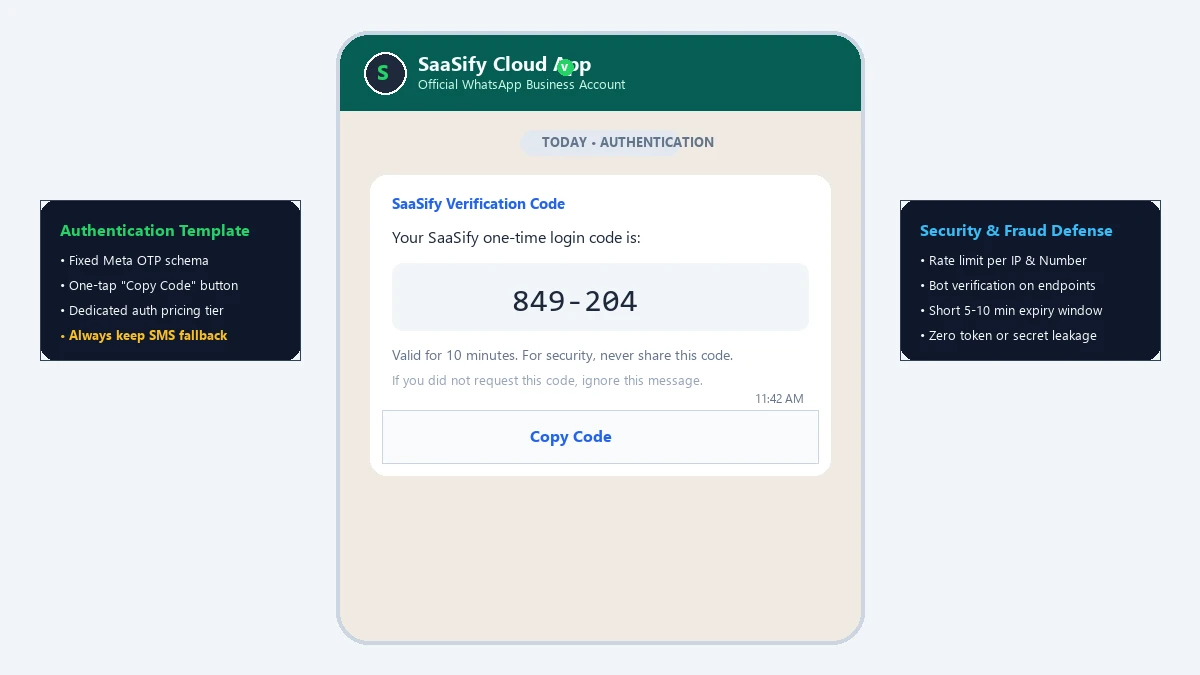
Send one-time passcodes with Meta's authentication templates. Check Meta's current rates against your SMS cost, and keep an SMS or email fallback for users who aren't on WhatsApp.
Authentication TemplatesTeam Incident Alerts
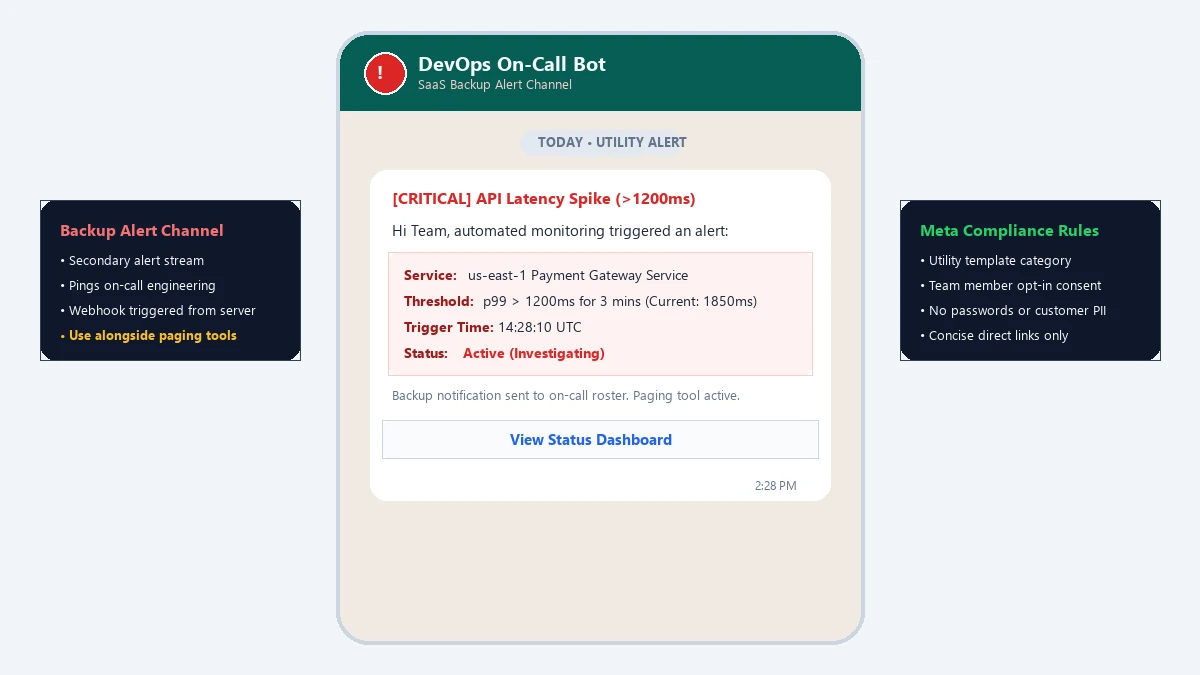
Send a short alert to on-call engineers from your monitoring tools through our API and webhooks, as a backup channel next to your paging tool.
API DocumentationEngage subscribers, recover revenue, and resolve support requests faster.
Send failed-payment reminders, renewal notices, and PDF invoice receipts directly in chat. See WhatsApp Payments.
Share release notes and major feature announcements with users who explicitly opted in to hear about product improvements.
Send ticket status updates and seamlessly route complex conversations to human agents in the shared team inbox.
Gather in-app survey ratings and feature feedback with interactive WhatsApp forms.
Notify account owners immediately when a new device logs in, an API key is generated, or security credentials are changed.
Alert administrators when their account reaches 80% or 95% of monthly credit or storage limits to prevent service interruptions.
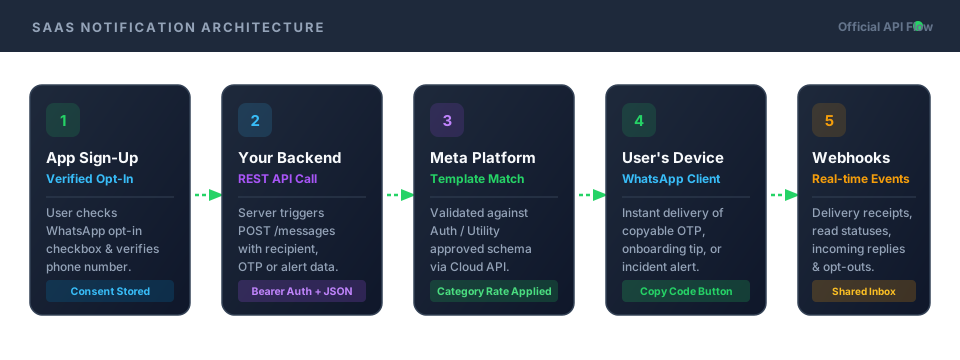
Four developer-friendly steps to connect your SaaS backend to the WhatsApp Cloud API.
Collect opt-in and a verified phone number at sign-up, with a clear tick box explaining message types.
Connect through our REST API and subscribe to inbound webhooks directly from your backend services.
Submit templates for authentication, utility and marketing messages, and get them approved by Meta.
Dispatch messages, process user replies in real time, and monitor delivery receipts and opt-out rates.
Essential developer considerations for implementing one-time passcodes securely and cost-effectively.
Use Meta's Authentication Templates
Authentication templates follow a strictly defined Meta format specifically optimized for one-time passcodes and include one-tap "Copy Code" action buttons.
Keep an SMS or Email Fallback
Not every user has WhatsApp installed or an active data connection. Always implement an automatic or user-selectable SMS/email fallback channel.
Add Rate Limits & Fraud Defenses
Add strict rate limits per phone number and per IP address, and verify phone numbers before dispatch. OTP endpoints are common targets for bot abuse that can run up unnecessary message costs.
Short Expiry & Zero Secrets in Text
Set a short code expiry window (e.g. 5–10 minutes), and never send permanent passwords, bearer tokens, or sensitive user data in any message body.
Dedicated Authentication Pricing Tier
Meta prices authentication templates under a dedicated auth rate card that varies by country. Always check Meta's current authentication rates against your SMS provider's rates.
WhatsApp works well as an extra channel for your on-call team, but it isn't an incident-management tool. It has no escalation policies or acknowledgements, and delivery is not guaranteed. We recommend using it as a secondary notification stream alongside your dedicated paging tool.
Keep alerts short, link directly to your internal status dashboard, and leave API secrets and customer PII out of the message payload.
All on-call team members must agree to receive operational messages, and each alert template must be approved under Meta's Utility category.
Everything you need to integrate WhatsApp messaging into your product stack.
Postman API Docs
Complete REST API documentation with ready-to-run cURL snippets, payload parameters, and authentication headers.
View API DocsHelp Center
Step-by-step guides on connecting phone numbers, configuring webhooks, and troubleshooting template status codes.
Visit Help CenterTemplate Library
Pre-approved template examples for SaaS onboarding, OTP authentication, and account lifecycle alerts.
Browse TemplatesMessage only users who explicitly agreed to receive WhatsApp messages during sign-up or inside account settings, and make opting out easy by honoring STOP commands.
Do not mix promotional content into authentication or utility messages. Meta categorizes templates strictly, and mixing promotional copy into an account alert risks template reclassification or account review.
For complete requirements and messaging limits, review our WhatsApp API requirements guide.
Developer and product questions about authentication, webhooks, alerting, and Meta pricing.
Yes. You can send one-time passcodes with Meta's authentication templates to users who use WhatsApp. Because not every user is on WhatsApp, keep an SMS or email fallback.
It depends on the country and the current rates of Meta and your SMS provider. Compare them before you switch.
No. WhatsApp has no escalation or acknowledgements and doesn't guarantee delivery. Use it as an extra channel.
Yes. Collect opt-in at sign-up, and make opting out easy.
Authentication templates for OTPs, utility templates for account and billing messages, and marketing templates for product updates.
Yes. See our API documentation.
Yes, through webhooks and the shared team inbox.
Login codes are authentication templates, onboarding and account alerts are usually utility, and product announcements are marketing, so Meta bills each type at its own rate. See the pricing page for current plans.
Send onboarding messages, login codes and alerts through the official WhatsApp Business API. Try CampaigningTool free for 7 days.