Let people register for your event in a chat, get a reminder with the join link before it starts, and receive their certificate afterwards. CampaigningTool runs on the official WhatsApp Business API, uses Meta-approved templates and messages only people who registered or agreed to hear from you.
Engage attendees from first registration through post-event feedback and certificate delivery.
Replace long forms with a short in-chat form or a message. People can register from a Click-to-WhatsApp ad, a QR code or a link, and get a confirmation straight away. See WhatsApp forms.
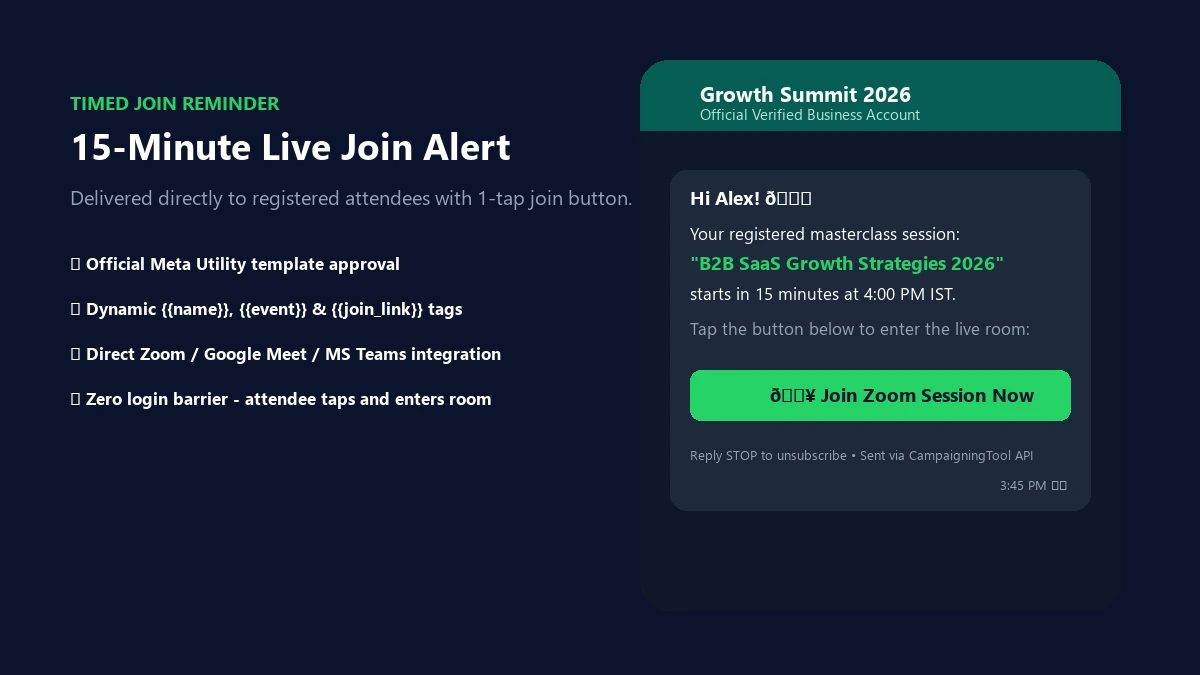
Explore WhatsApp FormsSend reminders before the event, for example a day, an hour and 15 minutes ahead, with your Zoom or Meet link, so attendees can join in one tap. Schedule automated sequences with Meta-approved utility templates.
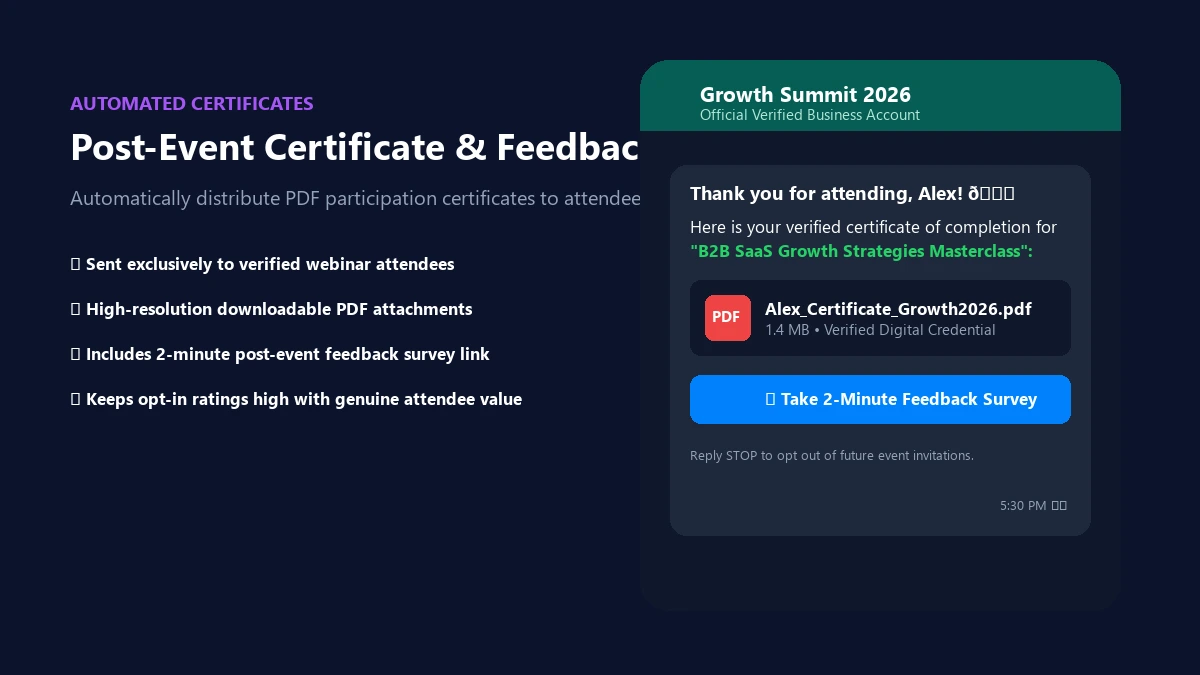
WhatsApp SchedulerSend PDF participation certificates and a feedback request after the event, to the people who attended. Collect rapid NPS ratings and keep attendees engaged for your upcoming summits.
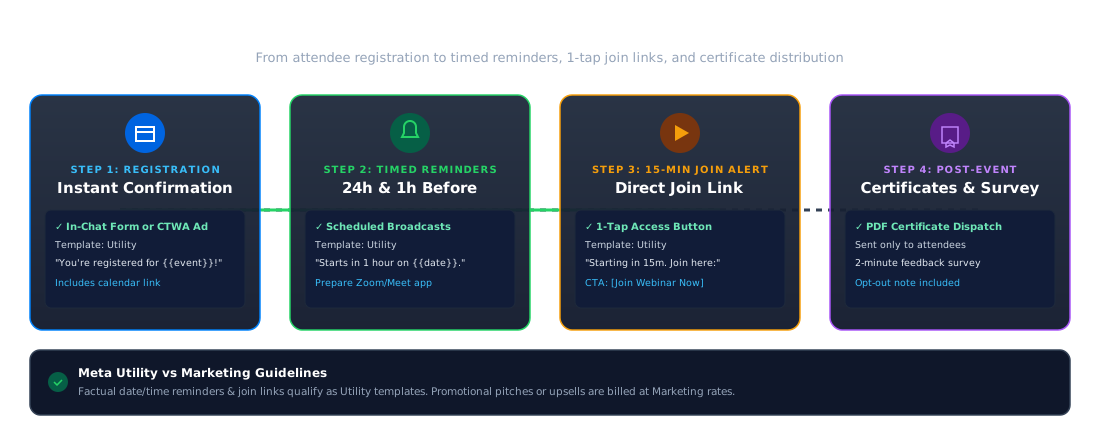
Browse Template LibraryA simple, automated 4-step sequence from attendee sign-up to post-event engagement.
Collect registrations with consent to receive WhatsApp messages from chat links, ads or embedded forms.
Send an instant confirmation message containing event details, date, time and a calendar link or invite file.
Schedule timely reminders with Meta-approved templates using our WhatsApp scheduler.
Send personalized PDF participation certificates and quick feedback surveys after the event to attendees.
Recommended sequence for webinars, workshops, and multi-day conferences.
| When | Message | Typical template type |
|---|---|---|
| Right after registration | Confirmation with date and calendar link | Utility |
| 24 hours before | Reminder with date and time | Utility |
| 1 hour before | Reminder with the join link | Utility |
| 15 minutes before | "Starting soon" with the join link | Utility |
| After the event | Thank-you and certificate | Utility |
| After the event | Feedback request | Utility or marketing |
| Later | Invitation to your next event | Marketing |
Meta-compliant template copy for each stage of your event lifecycle.
Many organizers use both. WhatsApp suits short, time-sensitive reminders such as "starting in 15 minutes", and email suits longer details such as agendas and speaker bios.
Use whichever each attendee agreed to, and don't send the same reminder on both channels at once to prevent notification fatigue.
Trusted by organizers running virtual sessions, summits, and physical gatherings.
Online educators and B2B SaaS teams send instant access links and session recordings to registered professionals.
Large-scale event managers deliver badge QR codes, keynote hall schedules, and venue map links directly in chat.
Hands-on coaches share pre-workshop preparation materials, resource files, and interactive worksheets.
Local tech and professional chapter leads ping members with location pins and last-minute RSVP updates.
Brands broadcast live stream links and reveal exclusive early-bird discount codes to VIP waitlists.
Campus committees distribute event passes, competition schedules, and e-certificates for college fests.
Message only people who registered or agreed to receive messages, and make opting out easy by supporting standard keywords like STOP.
Keep reminders factual, and don't mix promotion into utility messages to prevent template reclassification or account warnings. Send certificates only to the people who attended.
For complete compliance guidelines and message tier rules, review our WhatsApp API requirements guide.
Everything you need to know about reminders, join links, templates, and Meta policies.
Attendees register through a WhatsApp chat, form or ad, get a confirmation, and receive reminders with the join link before the event, using Meta-approved templates, for people who agreed to receive messages.
Yes. Include it in a reminder template, for example one sent an hour or 15 minutes before the event.
Yes, for messages sent more than 24 hours after a person's last message. A 24-hour-before reminder usually needs one.
Yes, you can send a calendar link or file with the confirmation.
Yes. Send a PDF to the people who attended, after the event.
They suit different jobs. WhatsApp works well for short, time-sensitive reminders, and email for longer details. Use the channel each attendee agreed to.
Yes. WhatsApp requires opt-in, and every message should make it easy to opt out.
Event invites and promotions are usually marketing messages, while a joining link sent after someone registers is often utility. See the pricing page for current plans.
Collect registrations, send reminders with the join link and share certificates afterwards. Try CampaigningTool free for 7 days.