
Share brochures, book test drives, remind customers about services and renewals, and answer questions on WhatsApp. CampaigningTool runs on the official WhatsApp Business API, so your sales and service teams can reply from one number, and every message goes to people who agreed to hear from you.
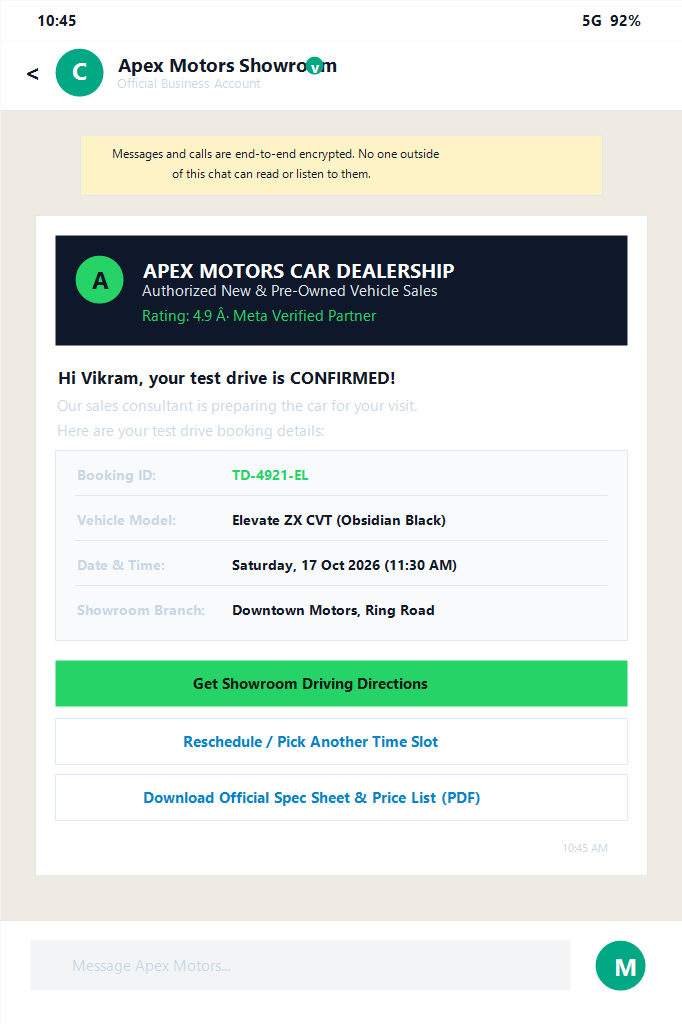
Streamline car sales and workshop operations from the first brochure request to regular scheduled maintenance.
Test drive bookings
Send the model brochure, ask for a preferred date and branch with an interactive WhatsApp form, and confirm the slot in the same chat.
Service reminders
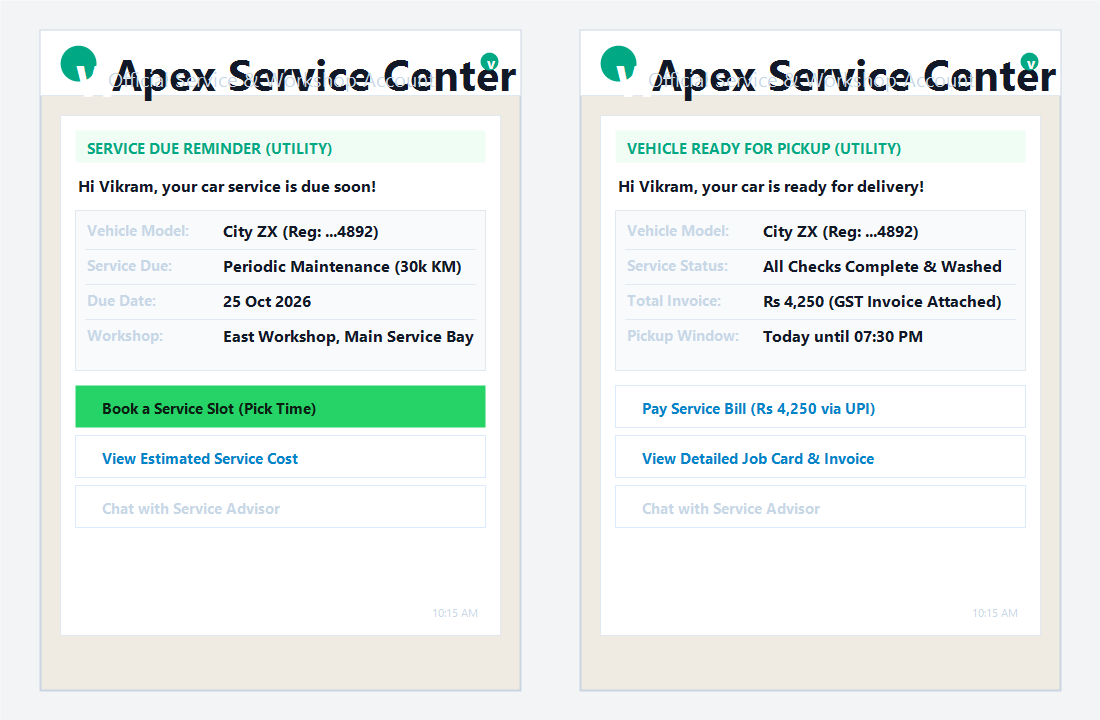
Remind customers when a service is due, with a button to pick a slot. Upload your due-date list, or send it directly from your own system through the REST API.
Insurance and warranty renewals
Send a renewal reminder with a secure payment link before the policy ends, if your dealership is authorised to sell insurance.
A buyer comparing three showrooms usually goes with the one that replies first. Customers ask the same things again and again: the on-road price, a colour in stock, the official brochure, and the nearest branch location. A quick answer on WhatsApp, with the PDF brochure attached, keeps the enquiry alive instead of letting it cool down.
After the sale, service is where most of the customer's ongoing contact happens, and where vehicle owners frequently forget dates. A WhatsApp reminder with an interactive slot booking button is far easier to act on than an unexpected phone call or an ignored email.
Equip sales advisors and service managers with tools built for automotive customer engagement.
Send specification PDFs, feature breakdown images and walk-around videos directly in chat, within WhatsApp's standard file size limits.
A native WhatsApp form collects vehicle model, preferred date, showroom branch and customer name, and assigns the booking to the right consultant.
Remind vehicle owners before periodic maintenance is due using our scheduler, then notify them the moment the vehicle is ready for pickup.
Send a 1-click payment link for token advance booking amounts and automatically follow up with a digital receipt via WhatsApp Pay.
Send motor insurance policy renewal and extended warranty reminders before expiry, where your dealership is legally authorised to do so.
After a new car delivery or workshop service, ask every customer for honest feedback and a Google review.
Set up multi-agent automotive messaging in four clear steps.
Link your official WhatsApp Business API number. If you need onboarding guidance, visit our WhatsApp Business API guide.
Add an explicit opt-in tick box on your enquiry form, showroom visit sheet and service job card, and timestamp when and where the customer agreed.
Choose pre-built automotive templates from our template library and submit them to Meta for quick automated approval.
Send manually, in bulk, or on an automated schedule with the WhatsApp scheduler, and reply to customers in the shared team inbox.
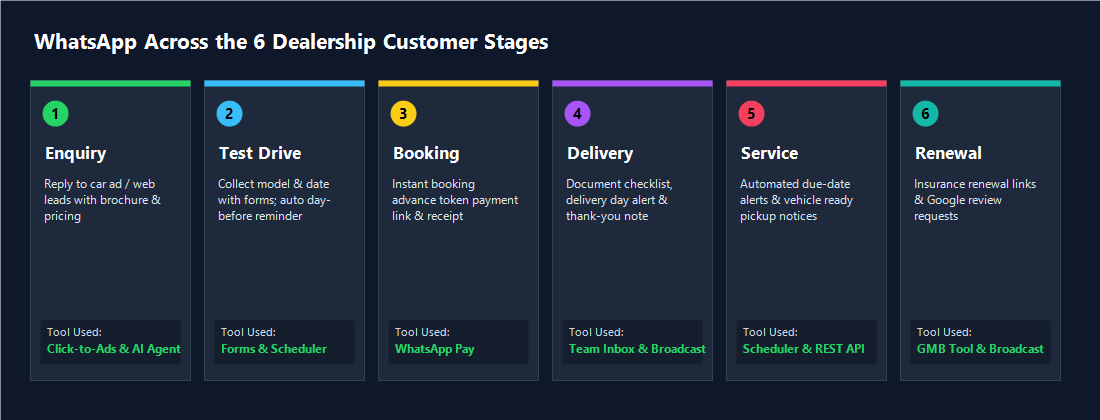
From initial ad enquiry to test drive, delivery, periodic workshop service, and insurance renewal.
| Stage | What You Can Send | Recommended Tool |
|---|---|---|
| Enquiry | Reply to an ad or website enquiry, share the official PDF brochure, on-road pricing and answer common questions. | Click-to-WhatsApp ads, AI agent |
| Test drive | Interactive test drive booking form, instant confirmation message, and automated day-before reminder. | Forms, Scheduler |
| Booking | 1-click payment link for the token advance booking amount, booking confirmation, and PDF receipt. | WhatsApp Pay |
| Delivery | Confirmed delivery date, registration checklist, handover time, and celebratory thank-you message. | Broadcast, Team Inbox |
| Service | Scheduled maintenance due-date reminder, workshop slot booking, and "your car is ready" pickup alert. | Scheduler, REST API |
| Renewal & feedback | Motor insurance and extended warranty renewal notices with payment link, plus Google review requests. | Broadcast, Google reviews |
Use pre-approved, high-converting WhatsApp message structures across the automotive lifecycle.
These are representative samples. Meta reviews every template and assigns its final classification (Utility, Marketing, or Service).
Ensure regulatory compliance, customer trust, and strict adherence to Meta and Google policies.
Tailored automotive solutions for vehicle sales, pre-owned markets, and workshop networks.
New car and two-wheeler dealerships
Digital brochure delivery, test drive booking forms, token advance payments, and new vehicle delivery day checklists.
Used car dealers
Share verified vehicle condition photos and walk-around videos, answer on-road pricing questions, and book showroom visits.
Service centres and workshops
Automated periodic maintenance reminders, service bay slot bookings, estimate approvals, and "your vehicle is ready" alerts.
Multi-branch groups
One centralized team inbox with intelligent auto-routing to assign each lead to the exact showroom, service bay, or sales executive.
Test drive and service reminders are usually utility templates, while new-model offers are marketing, and Meta bills the two at different rates. Your CampaigningTool plan plus 18% GST comes on top, with no markup on what Meta charges.
Explore Pricing Plans & Meta RatesCommon questions about test drives, service reminders, renewals and rules.
Yes, through the official WhatsApp Business API. You message only customers who agreed to hear from you, and you use templates approved by Meta. Your sales and service teams can reply from one number.
Yes. Send the brochure and a WhatsApp form that asks for the model, date, branch and name. Then confirm the slot in the same chat and send a reminder the day before with the scheduler.
Yes. Upload a list with each customer's name, vehicle and due date, or send the data from your own system through our REST API. Each reminder is an approved template, and you can add a button to book a slot.
You can connect your own software through our API and webhooks. If your DMS can send data that way, reminders can go out automatically. If not, you can upload a list. Contact our team and tell us which DMS you use, so we can say whether it fits.
Yes. You can attach PDFs, images and videos to a message, within WhatsApp's file size limits. Customers keep the brochure in the same chat as your replies.
Yes, if your dealership is authorised to sell insurance. Send an approved template before the policy ends, with a payment link. Check your regulator's rules on insurance sales and messaging before you start.
Only if they agreed to receive WhatsApp messages. A phone number from a portal is not enough. With Click-to-WhatsApp ads, people start the chat themselves, so you can reply right away.
Yes. Send a payment link for the booking amount and a receipt once it is paid, using WhatsApp Pay. Never ask customers to send card numbers in the chat.
Yes. Everyone replies from the same number in the team inbox, and each chat can be assigned to the right person, such as a sales executive, an advisor or a branch.
Test drive and service reminders are usually utility templates, while new-model offers are marketing, and Meta bills the two at different rates. See the pricing page for current plans.
Purpose-built tools to automate lead capture, booking workflows, and service retention.
WhatsApp Forms
Capture test drive preferences and service job card details inside chat.
Build Dealership FormsWhatsApp Scheduler
Automate service due-date reminders, test drive alerts, and renewal notices.
Set Up SchedulerWhatsApp Pay
Collect advance booking tokens and service invoices seamlessly with UPI.
Set Up In-Chat PayClick-to-WhatsApp Ads
Route Facebook and Instagram new car ad clicks directly into live chats.
Connect Meta AdsMulti-User Team Inbox
Assign chats across sales consultants, service advisors, and showroom branches.
Explore Team InboxGoogle Business Reviews
Automatically invite all delivery and workshop customers to leave Google reviews.
Automate ReviewsConnect your number, get your templates approved and send your first test drive or service reminder. Try it free for 7 days.